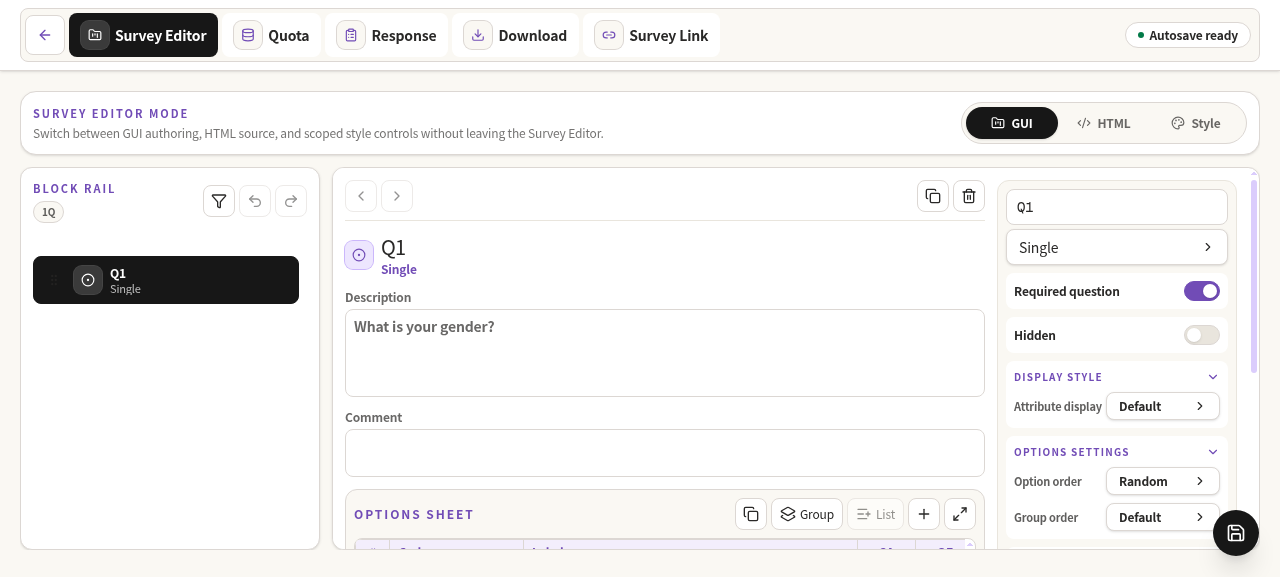
Workbench Surface
The Survey Editor workbench separates navigation, authoring, and specialized surfaces without mixing responsibilities.
Layout contract
- The top Workbench navigation contains
Editor,Quota, andLinkonly. - Response review and download/export are intentionally outside Workbench and will use dedicated entrypoints.
- The left Block Rail owns survey block navigation, filtering, and insert affordances.
- The main canvas owns the selected block editor.
- GUI, HTML, and Style modes are separate authoring surfaces over the same survey source.
- Logic is progressive and local to the selected block instead of a persistent right sidebar.
Survey Link settings dialog
The existing Survey Link settings dialog owns page animation, back button toggles, question badge visibility, and terminal redirect editing. Redirect editing stays inside that dialog as a second column; it does not add a new Workbench navigation tab or separate surface.
- Disable redirect rules to keep the built-in end page and save
redirectGroupasnull. - Use the default radio to choose the fallback group.
- Edit group
nameandtitleinside group accordions. - Edit route
urlandiffields inside the selected group. - A single remaining group is kept as default and cannot be deleted until another group exists.
Mode boundaries
| Mode | Primary responsibility | Must preserve |
|---|---|---|
| GUI | Visual authoring of blocks and question settings. | Canonical HTML DSL serialization. |
| HTML | Direct source editing. | Parser diagnostics and canonical source rules. |
| Style | Built-in CSS preview and theme customization. | Survey Link rendering contracts. |
Actual UI evidence
The screenshot below is captured from a running app and should be updated when the workbench surface changes.